Apple Watch puzzle games: what works on a tiny screen
Glanceable boards, fingertip-sized pieces, the Digital Crown, haptics and standalone play: what makes a puzzle game work on Apple Watch.
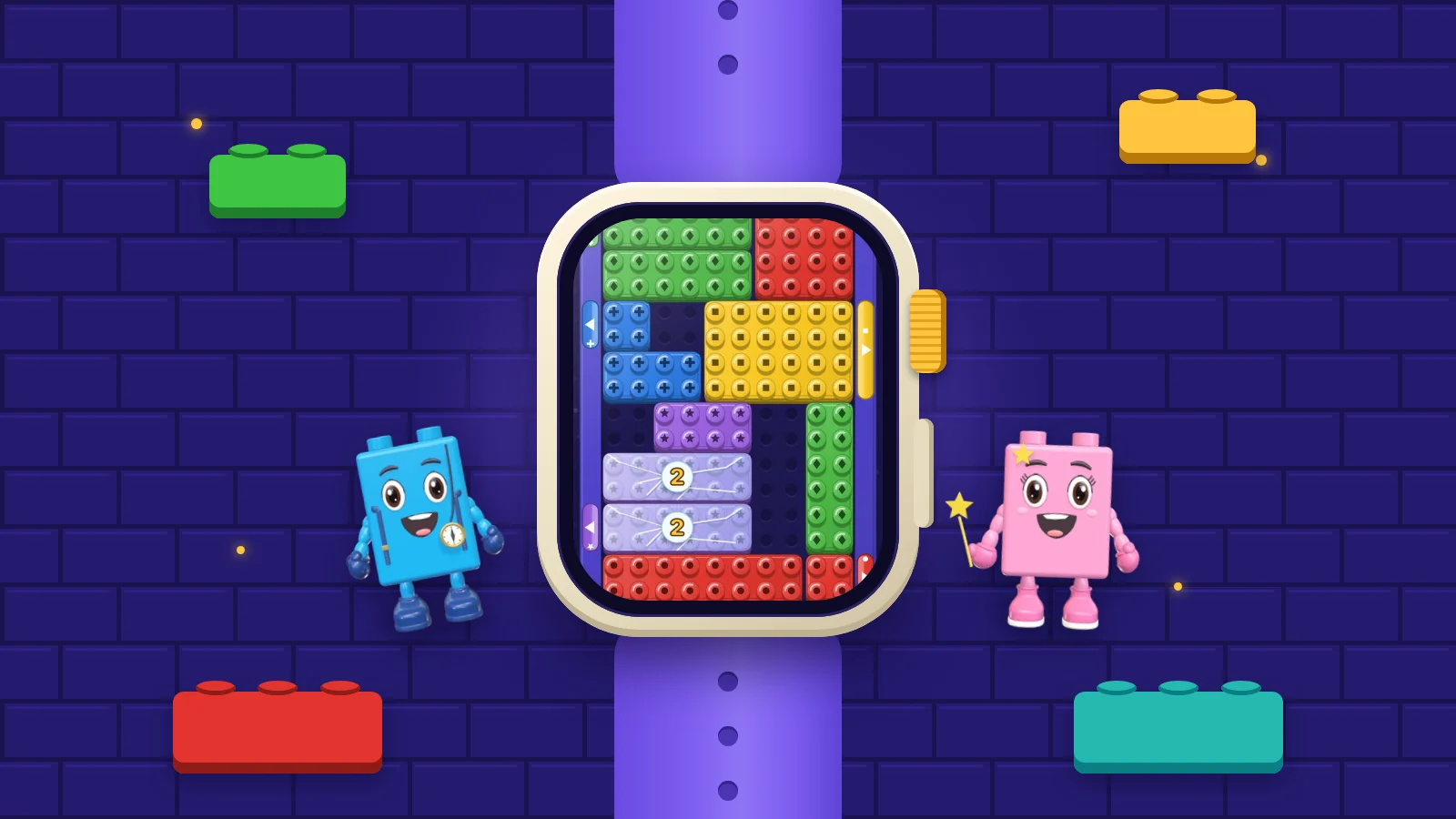
Most puzzle games are designed for a screen you hold in your hand and look at for a few minutes. An Apple Watch screen sits on your wrist, gets a glance of a few seconds, and is worked by the hand you are not wearing it on. That changes nearly every design decision, from how big a piece can be to what a clear should feel like. OutBrick has a standalone Apple Watch game, so these are questions I have spent a lot of time on. This piece is about the design space in general: what Apple’s own guidance says, and what I look for when I try a puzzle game on the wrist.
Apple’s description of how people use a watch is the best brief a wrist puzzle designer can get. People raise their wrist, hold the display about a foot from their eyes, and use the other hand to interact. They glance at the watch many times a day, in interactions that can last less than a minute each. Apple’s list of best practices for watchOS opens with the same idea: support quick, glanceable, single-screen interactions.
For a puzzle, that rules out a lot. A board you have to scroll to see is out, because the whole state has to be visible in the time it takes to raise a wrist. So is a board with thirty small pieces, because nobody can read it in a glance. The boards that work on a watch are small ones with few pieces, strong contrast and one obvious goal. The depth has to come from how the pieces get in each other’s way rather than from how many of them there are.
Text needs the same care. Apple’s guidance for games lists a default text size of 16 points on watchOS and a minimum of 12. Anything a player must read during a board, such as a move count, belongs at the default size or above. Anything that can be left out of the wrist version probably should be.
Sources1Apple. (n.d.). Designing for watchOS. Human Interface Guidelines. Retrieved September 24, 2026, from https://developer.apple.com/design/human-interface-guidelines/designing-for-watchos2Apple. (n.d.). Designing for games. Human Interface Guidelines. Retrieved September 24, 2026, from https://developer.apple.com/design/human-interface-guidelines/designing-for-games
On the watch, people use the gestures they know from iPhone: tap, swipe and drag. The difference is scale. A fingertip covers a large share of a watch display, so the piece you are moving and the space you are moving it into can both disappear under your finger. Apple recommends buttons of 44 by 44 points by default on watchOS, and never smaller than 28 by 28. Game pieces follow the same logic. If a piece is smaller than a fingertip, players will miss it or grab its neighbour.
The Digital Crown is the other input, and since watchOS 10 Apple has treated it as the main way to navigate: turning it scrolls lists and moves between vertically paginated screens. Apps receive turns of the Crown but not presses, which the system keeps for itself. Apple also asks that anything anchored to the Crown has a matching touch interaction, and that the screen responds visibly as it turns, because otherwise people assume it does nothing.
For puzzle designers, the Crown suits choices along one line: stepping through a list of levels, choosing which piece is selected, or scrubbing back through moves. It is a poor fit for moving things around a two-dimensional grid. Whatever it does, a player should always be able to do the same thing with a finger. There is no fallback to a controller either. Apple’s guidance for games notes that watchOS is the one Apple platform that does not support physical game controllers.
Sources2Apple. (n.d.). Designing for games. Human Interface Guidelines. Retrieved September 24, 2026, from https://developer.apple.com/design/human-interface-guidelines/designing-for-games3Apple. (n.d.). Digital Crown. Human Interface Guidelines. Retrieved September 24, 2026, from https://developer.apple.com/design/human-interface-guidelines/digital-crown
A phone puzzle can assume the player has settled in for a few minutes. A watch puzzle cannot. The wrist drops when a bus arrives, a kettle boils or someone starts talking, and the game has to accept that without penalty. In practice that means saving the board after every move, coming back to exactly the same position on the next raise, and never letting anything run down while the screen is dark.
Clocks are the clearest example. A countdown on a watch puzzle punishes the player for the very thing the device is built around, which is looking away. A move limit works much better, because it asks the player not to waste moves and then waits for them. OutBrick has no clock anywhere in the game, and a board takes about two minutes, which already sits at the short end of what a puzzle can be. The reasoning behind that length is in why two-minute puzzles feel good.
The shape of the progression matters too. A wrist session is one board, occasionally two. Long chains of objectives, daily tasks that need ten boards to complete, and story scenes between levels all work against it. A watch puzzle should make a single board feel like a complete thing to have done, so that lowering your arm feels like finishing rather than abandoning.
Sources1Apple. (n.d.). Designing for watchOS. Human Interface Guidelines. Retrieved September 24, 2026, from https://developer.apple.com/design/human-interface-guidelines/designing-for-watchos
The watch sits against your skin, which makes haptics unusually effective. watchOS defines a set of built-in haptic patterns, each with its own meaning, played by the Taptic Engine and combined with an audible tone. Apple’s advice is to use those patterns for what they are documented to mean, and to use haptics consistently, so that each pattern has a clear link to the action that caused it.
A puzzle has only a few events worth feeling: a piece arriving somewhere useful, a move that is blocked, and a clear. Give each one its own pattern and keep to it. If the same buzz means both “blocked” and “solved”, the player stops trusting it. Apple also warns against overuse, noting that a haptic which feels right now and then can become tiresome when it plays often. On a watch that is an easy mistake to make, and a tap on every slide of every piece turns a quiet game into a buzzing one.
Apple’s own test is a good one: the best haptic is often one people are not conscious of, but miss when it is turned off. Haptics should back up what the screen shows and never replace it, because some people play with them switched off.
Sources4Apple. (n.d.). Playing haptics. Human Interface Guidelines. Retrieved September 24, 2026, from https://developer.apple.com/design/human-interface-guidelines/playing-haptics
A watch game can arrive in two ways. Apple’s developer documentation describes watch-only apps, which have no iPhone app at all, and watch apps that come with a companion iPhone app but can be installed and run without it. Apple encourages independent apps either way, because people expect watch apps to work when their phone is not with them. When there is a companion app, in-app purchases are universal, so something bought once is available on both devices.
For players the useful question is simpler: does the watch game run on its own, or is it a remote control for the phone? A standalone game is the one you can play on a walk with the phone left at home. OutBrick has a standalone Apple Watch game, alongside versions for iPhone, iPad, Mac and Apple Vision Pro. Progress lives in your iCloud, so a new device signed in to the same account picks up where the old one stopped.
If you are trying out puzzle games on your wrist, this is the short list I use. Most games pass some of these and fail others; the ones that pass all six tend to stay on the watch.
- The whole board is readable in one glance, without scrolling.
- Pieces are at least as big as a fingertip.
- Anything the Digital Crown does can also be done by touch.
- Dropping your wrist mid-board costs nothing.
- Each haptic means one thing, and they are not constant.
- The game runs without the phone nearby.
Sources5Apple. (n.d.). Creating independent watchOS apps. Apple Developer Documentation. Retrieved September 24, 2026, from https://developer.apple.com/documentation/watchos-apps/creating-independent-watchos-apps
Filed under
Questions, answered
A few useful answers
What makes a good Apple Watch puzzle game?
A board you can read in one glance, pieces big enough to hit with a fingertip, no clock, and a game that saves after every move so you can drop your wrist at any time. Haptics help when each pattern means one thing and they are used sparingly.
Do Apple Watch games need an iPhone?
Not always. Apple lets developers ship watch-only apps, and watch apps that can be installed and run independently of their iPhone companion. The simplest check is to try the game with your phone out of range.
Is OutBrick on Apple Watch?
Yes. OutBrick has a standalone Apple Watch game, and it also runs on iPhone, iPad, Mac and Apple Vision Pro.
Can watch games use the Digital Crown?
Yes. Apps receive turns of the Digital Crown and can use them for scrolling, selecting or adjusting values. Presses of the Crown are reserved for the system, and Apple asks that anything done with the Crown can also be done by touch.
APA 7
References
Where a source is a studio’s own history or a news account rather than a study, the article says so beside the claim.
- Apple. (n.d.). Designing for watchOS. Human Interface Guidelines. Retrieved September 24, 2026, from https://developer.apple.com/design/human-interface-guidelines/designing-for-watchos developer.apple.com/design/human-interface-guidelines/designing-for-watchos (opens in a new tab)
- Apple. (n.d.). Designing for games. Human Interface Guidelines. Retrieved September 24, 2026, from https://developer.apple.com/design/human-interface-guidelines/designing-for-games developer.apple.com/design/human-interface-guidelines/designing-for-games (opens in a new tab)
- Apple. (n.d.). Digital Crown. Human Interface Guidelines. Retrieved September 24, 2026, from https://developer.apple.com/design/human-interface-guidelines/digital-crown developer.apple.com/design/human-interface-guidelines/digital-crown (opens in a new tab)
- Apple. (n.d.). Playing haptics. Human Interface Guidelines. Retrieved September 24, 2026, from https://developer.apple.com/design/human-interface-guidelines/playing-haptics developer.apple.com/design/human-interface-guidelines/playing-haptics (opens in a new tab)
- Apple. (n.d.). Creating independent watchOS apps. Apple Developer Documentation. Retrieved September 24, 2026, from https://developer.apple.com/documentation/watchos-apps/creating-independent-watchos-apps developer.apple.com/documentation/watchos-apps/creating-independent-watchos-apps (opens in a new tab)