A Color Block Jam alternative with VoiceOver support
Considering OutBrick as a Color Block Jam alternative? Compare documented VoiceOver, colour-glyph and motion support, then use a practical checklist.
If you cannot reliably distinguish two gates, a colour-sort puzzle asks you to solve the interface before you solve the board. If you use VoiceOver, a visible route is only useful when the game also communicates the pieces and lets you act on them. Looking for a Color Block Jam alternative can therefore be a very specific search: you want the matching-door idea with clearer evidence that your way of playing is supported. OutBrick is a candidate because its App Store page explicitly declares VoiceOver, Differentiate Without Color Alone, Reduced Motion and Dark Interface. Those declarations are a useful starting point. They are not an independent audit or a guarantee for every player.
Color Block Jam, by Rollic Games, describes sliding coloured blocks to matching doors and planning before time runs out. Block Out! - Color Sort Puzzle, by Grand Games, describes a related loop with moving elevators and block generators. They are relevant alternatives in the same broad family, rather than games we dismiss on the basis of a missing label (Rollic Games, n.d.; Grand Games A.Ş., n.d.).
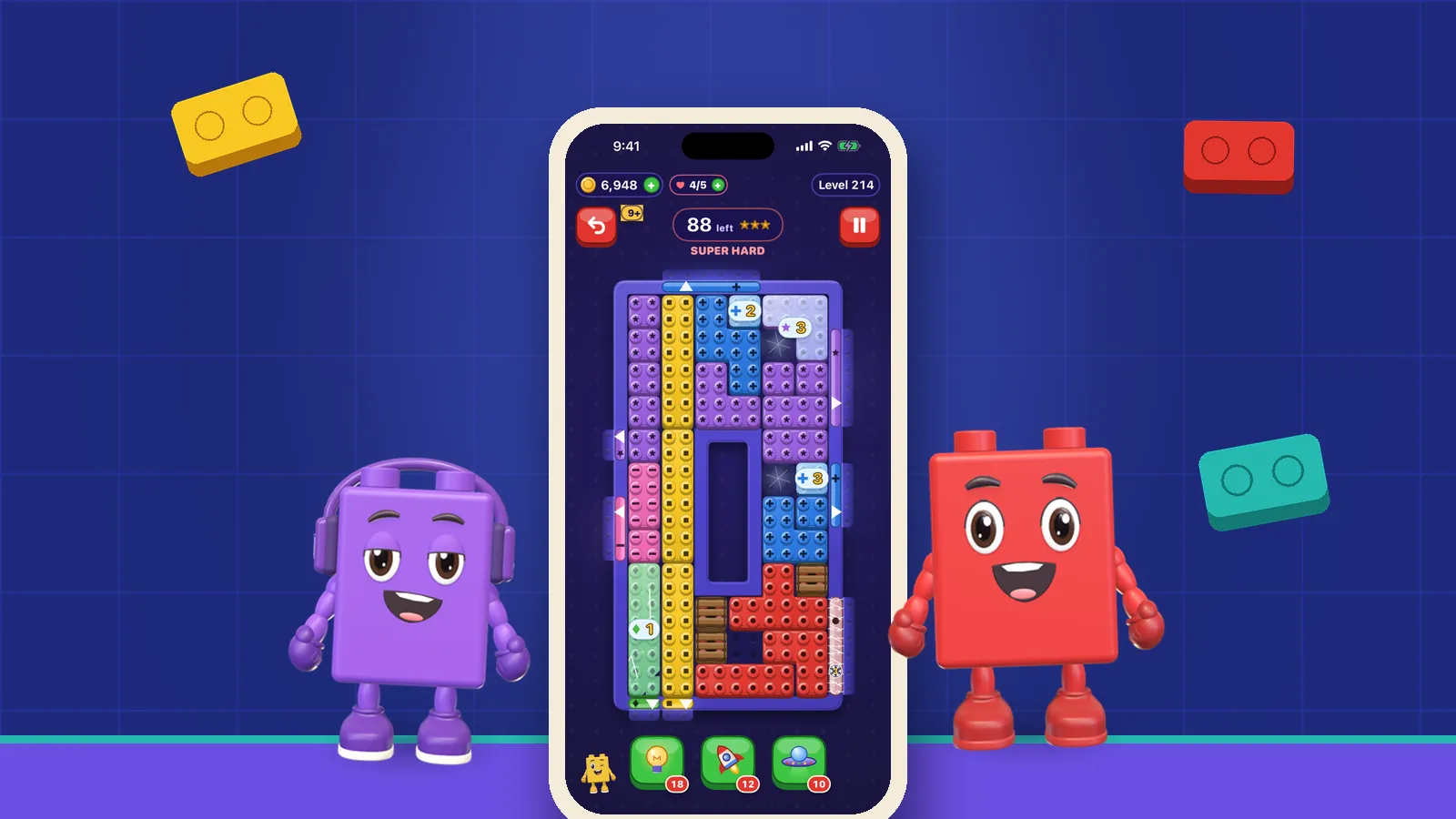
The OutBrick listing explicitly declares VoiceOver, Differentiate Without Color Alone, Reduced Motion and Dark Interface support (Hamdi, n.d.). Its colour-glyph approach pairs a distinct visible symbol with each brick and corresponding gate. That is a concrete feature to consider if colour alone is not reliable for you. Its sliding rule still needs to suit your preferences; accessibility information does not settle the question of which puzzle you enjoy.
At the time of checking, the two competitor pages had not indicated accessibility features. We cannot conclude from that wording that VoiceOver, redundant colour cues or motion options are absent. The defensible comparison is between published declarations. An undocumented feature could exist, and a declared feature can still behave differently across tasks, devices or versions.
Apple describes accessibility labels as developer-provided information about common tasks, with device-specific scope (Apple, n.d.). Treat them as a way to narrow a search, then inspect the game you intend to use. We make OutBrick, but have not conducted an independent side-by-side accessibility test of these three apps. This guide offers a verification method rather than a comparative accessibility score.
A screen reader announcing a Play button tells you how to enter a game. It does not tell you whether you can read the board, locate a matching gate, select the intended piece and complete a move independently. Those are separate tasks. Begin with a simple board, so an unfamiliar puzzle does not obscure an interface problem.
Ran et al. (2025) interviewed 32 experienced mobile players who were blind or had low vision. Their accounts describe varied motivations, barriers and strategies shaped by accessibility. This is evidence about the experience of those participants, not an evaluation of OutBrick or its competitors. It supports a practical question: which parts of playing can you do independently, and where does the interface ask you to seek help?
Before completing the tutorial, check whether you can identify the selected brick, understand its available movement and locate its destination. Then deliberately try a move that cannot succeed. Does the game communicate that refusal in a way you can perceive? A clear explanation matters as much as a successful action, because it keeps the next decision from becoming guesswork.
Our guide to screen-reader games on iPhone explains the broader context. For this particular download decision, keep a short task list: enter the board, inspect the pieces, act, detect the result, restart and leave. If one task is unclear, our support page provides a route to ask about the current app. Describe the device, version and action that fails rather than assuming a broad label answers every detail.
Sources4Ran, Z., Li, X., Xiao, Q., Fan, X., Li, F. M., Wang, Y., & Lu, Z. (2025). How users who are blind or low vision play mobile games: Perceptions, challenges, and strategies. In Proceedings of the 2025 CHI Conference on Human Factors in Computing Systems (pp. 1–18). Association for Computing Machinery.
A glyph on a block and the same glyph on its gate give you a second matching clue. That can help when two colours look similar. It is not the same as making every element equally readable: small symbols, low contrast, clutter or changing backgrounds can still make a cue hard to use. Look at the actual board size on your device, not only the enlarged store screenshots.
Mazur et al. (2025) surveyed 241 gamers with colour vision deficiencies. Eighty-eight per cent reported at least some gameplay difficulty, with colour matching and identifying objects by colour among the prominent problems. This was a self-selected survey, not an estimate of how often all gamers have colour vision deficiency. It does show why matching-gate tasks deserve attention beyond a general claim that an app is colourful.
Napoli and Chiasson (2018) provide a useful caution. Their small simulation study, with ten analysed participants and fixed-order conditions, did not find significant performance differences, although participants perceived greater difficulty and used pattern cues. Scores alone therefore should not stand in for the whole experience. The study does not prove that any particular symbol system solves the problem for every player.
Try matching a brick and gate using their symbols before using their hue. Can you distinguish the glyphs at your normal viewing distance, and do they remain useful when pieces overlap or sit near the edge? Our article on colour blindness in games supplies more background. W3C’s advice to provide information beyond colour is a useful design principle here, although web guidance is not proof of native-app conformance (World Wide Web Consortium, 2025).
Sources2Mazur, S., Hovis, J. K., & Ramaswamy, S. (2025). Difficulties that gamers with color vision deficiencies experience when playing digital games. Journal of the Optical Society of America A, 42(5), B365–B378.3Napoli, D., & Chiasson, S. (2018). Exploring the impact of colour-blindness on computer game performance. In Extended Abstracts of the 2018 CHI Conference on Human Factors in Computing Systems (pp. 1–6). Association for Computing Machinery.
OutBrick’s listing declares Reduced Motion and Dark Interface support (Hamdi, n.d.). These are distinct features. Dark styling does not guarantee sufficient contrast, and reduced animation does not guarantee every player will find the experience comfortable. Check how the board communicates an accepted move, a blocked move and a clear when your preferred settings are active.
Gonçalves et al. (2023) analysed more than 70 hours of blind creators’ gameplay to document strategies for visual-centric games. The work describes tradeoffs involving accessibility, agency and engagement. It does not represent every blind player or rank the apps discussed here. A relevant question is whether an adaptation lets you make meaningful decisions yourself, rather than merely watch someone else complete them.
For a puzzle, recovery is part of that agency. If you move the wrong brick, can you recognise the new state and decide what to do next? If you restart, can you find the control? Check any cost before using help. OutBrick has lives, optional rewarded advertising and in-app purchases; the accessibility declarations do not remove those systems. We do not describe it as unlimited, ad-free or free of purchase prompts.
Pacing belongs on the same checklist. OutBrick’s current version 4.2 release notes say all timing was removed, while Color Block Jam’s description mentions time running out. If time to inspect spoken information is essential, that documented pacing difference is worth considering (Hamdi, n.d.; Rollic Games, n.d.). Our guide to no-timer block-sort choices separates thinking time from move limits and retries.
Sources1Gonçalves, D., Piçarra, M., Pais, P., Guerreiro, J., & Rodrigues, A. (2023). “My Zelda Cane”: Strategies used by blind players to play visual-centric digital games. In Proceedings of the 2023 CHI Conference on Human Factors in Computing Systems (Article 289, pp. 1–15). Association for Computing Machinery.
OutBrick is a reasonable candidate if you want a matching-gate puzzle whose developer explicitly documents speech output, redundant colour cues and reduced motion. That is a preference-based recommendation grounded in its listing, not a promise of flawless access. If you already enjoy Color Block Jam or Block Out, ask their developers about the features you need; a missing declaration is not a reason to invent a negative verdict.
Prioritise your essential tasks before any purchase. Make a small checklist you can repeat after an update: navigate to a board, identify a brick and gate, execute a move, understand its result, recover and exit. Add a check for shop and advert controls if you plan to use them. A feature that works on the board should not be assumed to cover every surrounding screen.
Read our OutBrick accessibility information, then download OutBrick on the Apple App Store if its documented features match your needs. Review current compatibility there and test the native app on the device you will use. The browser board can introduce the classic movement idea, but it cannot certify the installed app’s VoiceOver or motion behaviour.
You do not need to justify a preference for larger cues, slower inspection or more predictable feedback. Those are practical requirements for enjoyable play. The value of a comparison is making those requirements visible, so you can choose with better information and give a developer a specific account of anything that still gets in the way.
Listings were retrieved on 30 September 2026. The research references below explain relevant barriers and strategies; none independently tested these apps.
Hamdi, M. (n.d.). OutBrick: Block Sort Puzzle [Mobile app]. App Store. Retrieved September 30, 2026, from the OutBrick listing.
Rollic Games. (n.d.). Color Block Jam [Mobile app]. App Store. Retrieved September 30, 2026, from the Color Block Jam listing.
Grand Games A.Ş. (n.d.). Block Out! - Color Sort Puzzle [Mobile app]. App Store. Retrieved September 30, 2026, from the Block Out listing.
Apple. (n.d.). Overview of Accessibility Nutrition Labels. Apple Developer. Retrieved September 30, 2026, from Apple’s accessibility label guidance.
World Wide Web Consortium. (2025, September 16). Understanding Success Criterion 1.4.1: Use of color. W3C’s explanation of colour and redundant information.
Filed under
Questions, answered
A few useful answers
Does OutBrick support VoiceOver?
Its developer explicitly declares VoiceOver support on the App Store. Check the board and surrounding tasks on your own device; a declaration is not an independent audit.
Does Color Block Jam lack accessibility features?
Its App Store page had not indicated accessibility support when checked on 30 September 2026. That does not establish that features are absent; ask the developer or test the tasks you need.
How do colour glyphs help with block-sort puzzles?
Matching symbols on a brick and gate provide another clue beyond their colour. Their size, contrast and clarity still need to suit the player and device.
Does an accessibility label mean Apple certified the game?
No. Apple describes the labels as developer-provided accessibility information. They help with discovery but do not replace checking your essential tasks in the installed game.
APA 7
References
Where a source is a studio’s own history or a news account rather than a study, the article says so beside the claim.
- Gonçalves, D., Piçarra, M., Pais, P., Guerreiro, J., & Rodrigues, A. (2023). “My Zelda Cane”: Strategies used by blind players to play visual-centric digital games. In Proceedings of the 2023 CHI Conference on Human Factors in Computing Systems (Article 289, pp. 1–15). Association for Computing Machinery. doi.org/10.1145/3544548.3580702 (opens in a new tab)
- Mazur, S., Hovis, J. K., & Ramaswamy, S. (2025). Difficulties that gamers with color vision deficiencies experience when playing digital games. Journal of the Optical Society of America A, 42(5), B365–B378. doi.org/10.1364/JOSAA.544903 (opens in a new tab)
- Napoli, D., & Chiasson, S. (2018). Exploring the impact of colour-blindness on computer game performance. In Extended Abstracts of the 2018 CHI Conference on Human Factors in Computing Systems (pp. 1–6). Association for Computing Machinery. doi.org/10.1145/3170427.3188555 (opens in a new tab)
- Ran, Z., Li, X., Xiao, Q., Fan, X., Li, F. M., Wang, Y., & Lu, Z. (2025). How users who are blind or low vision play mobile games: Perceptions, challenges, and strategies. In Proceedings of the 2025 CHI Conference on Human Factors in Computing Systems (pp. 1–18). Association for Computing Machinery. doi.org/10.1145/3706598.3714205 (opens in a new tab)